Comments Don’t Convert Themselves
ManyChat helps turn comments, DMs, and social media interest into guided conversations so people know what to do next.
Want to try comment-to-DM automation without overcomplicating it?
If you already get people commenting “link,” “info,” “price,” or “send details” on your Instagram posts, ManyChat can help you turn those comments into organized DM conversations automatically.
You do not need a huge funnel to start. Try it with one post, one keyword, and one helpful reply flow.
Disclosure: This page contains an affiliate link, which means I may earn a commission if you sign up through my link, at no extra cost to you.
[Try ManyChat for comment-to-DM automation]
Quick Answer: What Is ManyChat Comment-to-DM Automation?
ManyChat comment-to-DM automation is a workflow that sends an automatic direct message when someone comments a specific keyword on your Instagram post or reel.
It helps creators, coaches, service providers, online sellers, and small businesses guide interested people to a link, resource, offer, booking page, or next step without manually replying to every comment.
ManyChat’s help documentation explains that users can create an automation for post or reel comments and send people a DM after they comment. Meta’s Instagram Messaging API documentation also supports messaging solutions for Instagram Professional accounts.
Likes Are Nice. Follow-Up Is Better.
A like, comment, or “info please” message usually means someone is interested.
But interest can disappear quickly when there is no clear next step.
That is where ManyChat comment-to-DM automation can help. Instead of manually replying to every comment one by one, you can create a simple automated path that starts with a comment and continues inside the person’s DMs.
It does not replace real connection. It just helps make sure interested people are not left wondering, waiting, or digging through your bio like it is a treasure hunt.
What Is ManyChat?
ManyChat is a messaging automation tool that helps businesses create automated conversations across channels like Instagram, Messenger, WhatsApp, TikTok, and SMS. Its Instagram product page specifically describes automation for Instagram Direct Messages, automated replies, guided conversations, and customer responses.
In simple terms, ManyChat helps you create a message flow so people can get the right reply, link, resource, or next step faster.
For example, instead of commenting “link in bio” again and again, you can guide people directly into a DM conversation.
ManyChat can be especially helpful when your audience already asks for information through comments, replies, or DMs.
How ManyChat Comment-to-DM Automation Works
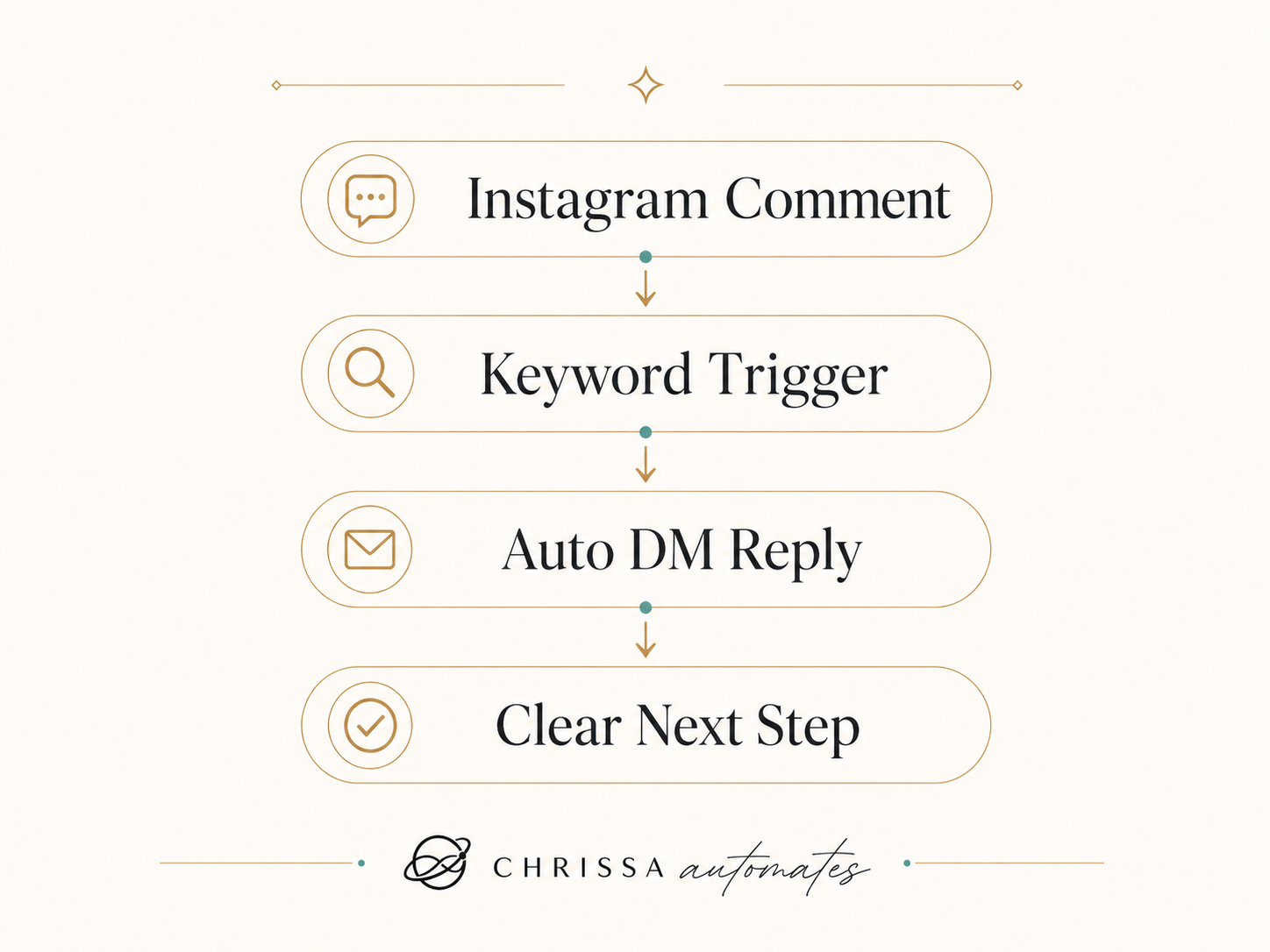
Here is the basic version:
-
You publish an Instagram post or reel.
-
You ask people to comment a keyword, such as “INFO,” “GUIDE,” or “LINK.”
-
ManyChat sends an automatic DM to the person who commented.
-
The DM can ask a question, offer choices, or send a link.
-
The person receives the right next step.
-
You can continue the conversation manually or connect the flow to another follow-up system.
ManyChat’s official help article for Auto-DM links from comments explains that users can set up automated comment replies through Quick Automations and choose comment triggers for posts or reels.
What ManyChat Is Best For
ManyChat is useful for creating a cleaner path between social media engagement and follow-up.
It can help with:
-
Sending an automatic DM when someone comments a keyword
-
Guiding people to a link, offer, resource, booking page, or next step
-
Answering common questions
-
Capturing interest while people are still engaged
-
Creating a simple conversation flow instead of replying manually every time
This makes it helpful for Instagram DM automation, comment automation, social media lead capture, ManyChat for small business, and workflows that help you automate Instagram replies.
Example ManyChat Comment-to-DM Workflow
Here is a simple example:
Someone comments “INFO” on a post.
ManyChat sends a DM.
The DM asks what they need help with.
The person chooses an option.
They receive the right link, guide, or next step.
The business can follow up more clearly.
That is the real value of comment-to-DM automation. It turns a public comment into a more guided private conversation.
A comment alone is not always a lead. But a comment with a clear next step can become a better conversation.
Who ManyChat Is Useful For
ManyChat can be useful for:
It is especially helpful if people already ask questions like:
Those comments are tiny doors. ManyChat helps you open the right one.
Is ManyChat a Good Fit?
ManyChat may be useful if...ManyChat may not be the first priority if...People comment “info,” “link,” or “price” on your postsYou do not have social engagement yetYou want to automate Instagram repliesYou do not have a clear offerYou need a cleaner way to send links or resourcesYou do not have a landing page or booking pageYou want to guide people through simple optionsYou do not have a follow-up process after the DMYour DMs are getting hard to manage manuallyYour audience does not know what to ask for yet
When ManyChat May Not Be the First Tool to Use
ManyChat is useful when social conversations are part of your lead journey.
But it may not be the first priority if:
-
You do not have social engagement yet
-
You do not have a clear offer
-
You do not have a landing page or booking page
-
You do not know what next step people should take
-
You have no follow-up process after the DM
Automation works best when the path is clear.
ManyChat can help send the message, but you still need a helpful offer, a clear next step, and a follow-up process that feels human.
ManyChat is a practical tool, but it should still be used responsibly. Automated DMs should be relevant to the comment, easy to understand, and connected to a clear next step. The goal is not to spam people. The goal is to make the follow-up easier when someone has already shown interest.
Why This Guide Is Written This Way
This page is educational, not a promise of results.
ManyChat can help automate parts of the conversation process, but it does not guarantee sales, leads, bookings, or revenue. The outcome still depends on your content, offer, audience, message quality, landing page, and follow-up process.
Because this page contains an affiliate link, the disclosure is included near the top and again before the button. The FTC’s endorsement guidance says disclosures should be clear, hard to miss, and placed with the endorsement message.
I created this guide for small business owners, creators, coaches, service providers, and online sellers who want a clearer way to manage social interest without making exaggerated claims.
My Take
I like ManyChat because it helps connect social engagement to a next step.
A comment alone is not a lead yet. Someone saying “INFO” or “send link” is showing interest, but the real value is what happens after that moment.
ManyChat helps create a guided path while the person is still interested.
For creators, coaches, service providers, and small businesses, this can make social media follow-up feel less scattered. Instead of manually checking comments, copying links, and replying one by one, you can build a simple flow that gives people the right direction faster.
Not every conversation should be automated. But the repetitive first step? That is often a good place to start.
Want to Turn Comments Into Conversations?
If your audience already comments, asks for info, or sends DMs, ManyChat can help you create a cleaner response flow.
ManyChat can support a cleaner Instagram DM automation flow, especially when people already comment keywords or ask for links. It is still important to have a clear offer, helpful message, and honest follow-up process.
Disclosure: This button uses an affiliate link. If you choose to sign up through my link, I may earn a commission at no extra cost to you.
Try ManyChat for Instagram DMs
Disclosure
Disclosure: This page contains affiliate links. If you choose to sign up through my link, I may earn a commission at no extra cost to you. I only create content around tools that fit the workflow, automation, and small business systems topics I discuss on Chrissa Automates.
Sources
This page references:
-
ManyChat’s official Instagram automation page for how ManyChat supports Instagram DM automation.
-
ManyChat’s official help article on Auto-DM links from comments.
-
Meta’s Instagram Messaging API documentation for the broader role of Instagram messaging tools for professional accounts.
-
FTC-related affiliate disclosure guidance for clear and visible affiliate disclosures.
Frequently Asked Questions
What is ManyChat used for?
ManyChat is used to automate message-based conversations on social channels. For small businesses, creators, coaches, and online sellers, it can help reply to common questions, send links, guide people through simple choices, and organize social media conversations.
Can ManyChat send a DM when someone comments on Instagram?
Yes. ManyChat can be used for Instagram comment-to-DM automation, where someone comments a keyword on a post or reel and receives an automated DM with the next step. ManyChat’s help documentation has a dedicated guide for Auto-DM links from comments.
Is ManyChat only for influencers?
No. ManyChat is not only for influencers. It can also be useful for small business owners, coaches, consultants, online sellers, event businesses, creators, and service providers who receive comments or DMs and need a clearer follow-up flow.
Do I need a big audience to use ManyChat?
No, but you do need enough social activity to make automation useful. If people already comment, ask for links, request pricing, or send DMs, ManyChat can help you respond in a more organized way. If you have very little engagement yet, content and offer clarity may be the better starting point.
Should I use ManyChat or a CRM?
ManyChat is best for starting and guiding social media conversations. A CRM is better for tracking leads, follow-ups, sales stages, appointments, and customer records. Many businesses may eventually use both: ManyChat for the first conversation and a CRM for longer follow-up.