Cold Outreach Has Changed
If you have been sending cold messages and getting ignored, you are not alone. The problem is not cold outreach itself. The problem is that most outreach today sounds the same.
AI tools have made it easier than ever to write messages at scale. But easier writing means more generic writing. Inboxes are now full of messages that follow the same pattern, use the same compliments, and pitch the same offers before the reader even knows who is writing to them.
The better strategy is not more volume. It is a better context.
The message needs a reason to exist.
When a message has a real reason behind it, it stands out. When it does not, it gets deleted. That is the shift that defines cold outreach in 2026.

What Is Signal-Based Outreach?
Signal-based outreach means reaching out because you noticed something specific, public, and relevant about a prospect.
A signal is anything visible that suggests a business may have a need, a gap, or an opportunity. Instead of contacting someone out of nowhere, you lead with something you actually noticed.
Examples of signals you can act on:
•A recent post or announcement
•A new business location opening
•A hiring update or job post
•A seasonal promotion with no clear follow-up system
•A new service or product launch
•A pattern in public reviews
•A website issue, such as a slow booking process or a missing contact form
•A public question or comment that reveals a pain point
•Active social media with weak lead capture
•An event announcement or local partnership opportunity
A signal turns a cold message into a relevant message.
You are not guessing what the prospect might need. You are connecting something they already made public to a solution you can offer. That is what makes the message feel timely rather than random.
What Is Not Working Anymore
Before looking at what works, it helps to be honest about what no longer does.
These outreach habits are costing people responses in 2026:
•Copy-paste messages sent to large lists without changes
•Fake compliments that sound like they were written by an AI reading a profile
•Long introductions that take three paragraphs to get to the point
•Sending the same pitch to every type of business regardless of what they actually need
•Asking for a call or booking in the first message
•Scraping contact lists without researching who is on them
•Automating before understanding your own offer or audience
•Following up with only “just checking in” with no new context
•Tracking only names and emails without capturing what signal you found
•Using AI to replace the research step entirely
Automation makes bad outreach faster. It does not make it better.
The tools are not the problem. The missing research and context are the problem. Adding automation to a weak process only speeds up the rejection.
What Still Works in 2026
Cold outreach still works when there is a real reason behind the message. Here is the workflow that holds up:
-
Choose a clear audience and be specific about the type of business you are contacting
-
Search for real prospects and note where you found each one
-
Collect public business research before writing anything
-
Identify the strongest signal you noticed about that business
-
Connect the signal to a likely pain point the business may have
-
Choose a message angle that fits the signal
-
Write a short, human message that leads with what you noticed
-
Ask one soft question instead of pitching immediately
-
Track the follow-up so no one falls through the cracks
-
Handle the reply with a clear next step ready
This is not a complicated system. But it requires doing the research before writing the message, not after. That is the step most people skip.
The result is outreach that feels like it was written for the person reading it, because it was.
Before You Automate Outreach, Track It First
Most people want to jump straight to automation. And that makes sense. Automation sounds like the solution to sending more messages with less work.
But automation only works when you already have a process worth automating. If you automate before the process is clear, you end up sending more of the same messages that are not working.
Before touching any automation tool, you need to know:
•Who you are contacting and why
•Where you found the lead
•What signal you noticed
•What pain point that signal suggests
•What message angle makes sense for that situation
•What message you actually sent
•When you should follow up
•What reply you received
•What next step to take based on the response
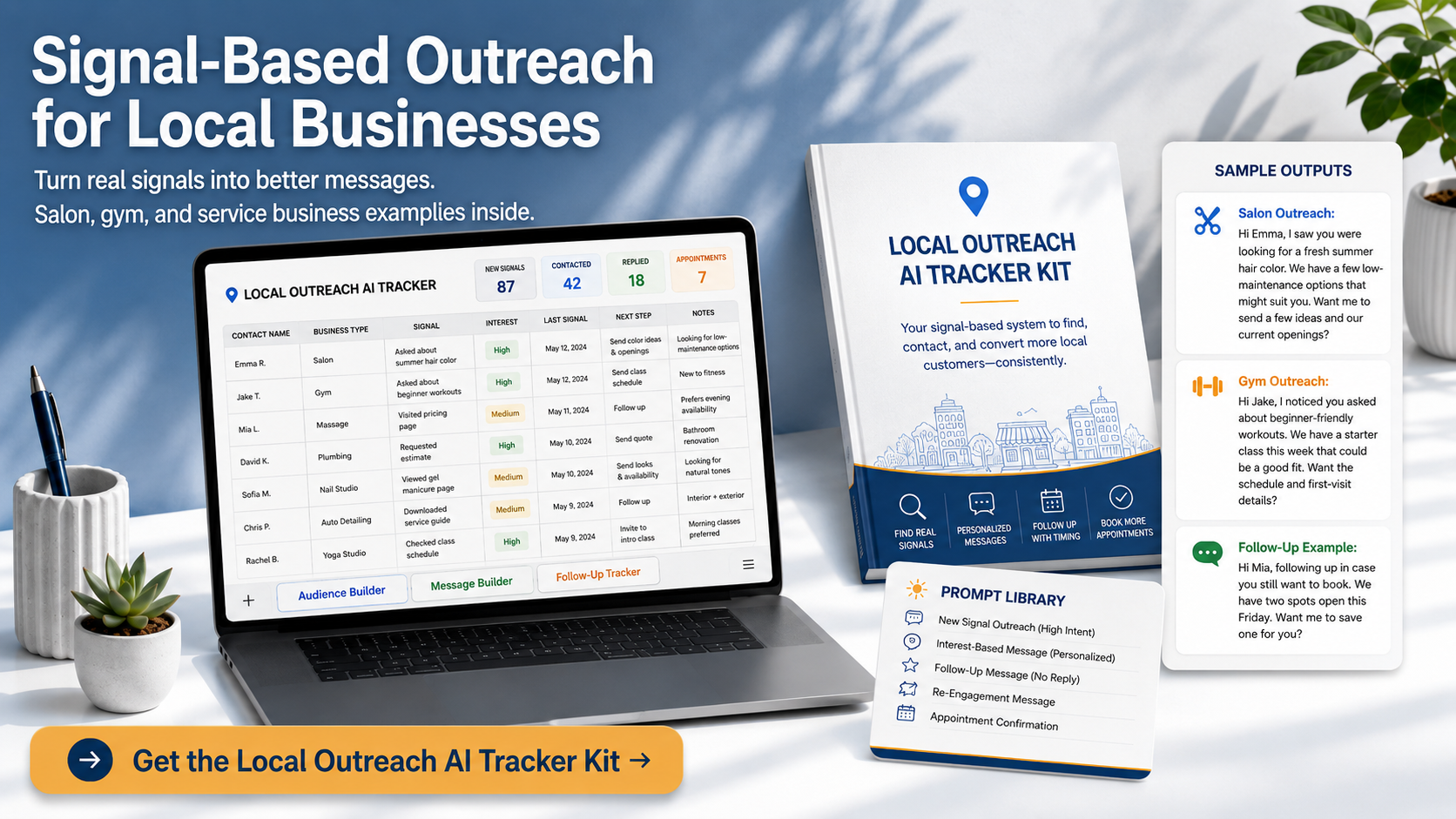
A Local Outreach AI Tracker is built for this part of the process. It helps you organize your outreach manually first, using a spreadsheet, a PDF guide, and a prompt library, so you can test what works before you automate anything.
Instead of starting with a blank sheet or a random AI prompt, you have a clear path for research, messaging, follow-ups, and replies. This will guide you to have a manual system for a few weeks and can see what is working, you will know exactly what to automate and what to keep doing by hand.
Here's a simple tracker layout you can set up in Google Sheets or Excel — one tab, straightforward columns:
Suggested Columns (left to right):
-
Prospect Name — business or contact name
-
Business Type — e.g. local gym, salon, restaurant
-
Where Found — Instagram, Google Maps, referral, etc.
-
Signal Noticed — the specific thing you observed
-
Likely Pain Point — what the signal suggests they need
-
Message Angle — your hook or approach
-
Date Messaged — when you sent the first message
-
Platform — email, Instagram DM, LinkedIn, etc.
-
Follow-Up Date — when to check back
-
Status — e.g. Messaged / Replied / Not Interested / Booked
-
Reply Notes — short summary of what they said
-
Next Step — what you plan to do next
How to use it row by row: Each prospect gets one row. Fill left to right as you go — research first (columns 1–6), then outreach (7–9), then track what happens (10–12). Never move to "message angle" until the signal and pain point columns are filled. That small rule stops you from sending signal-free messages.
Status labels to keep it clean: Use a simple dropdown — Messaged, Followed Up, Replied, Not Interested, Booked, On Hold. This makes it easy to filter and see who needs attention today.
If you would rather skip the setup, the Local Outreach AI Tracker Kit is a done-for-you version of everything described in this section. It includes a pre-built spreadsheet with all the tabs already structured, a PDF walkthrough guide, and a prompt library with ready-to-use AI prompts for every stage — from finding prospects to writing follow-ups. Instead of building the system from scratch, you open it and start filling it in. Get the Local Outreach AI Tracker Kit here →
Where Automation Fits in Cold Outreach
Automation is not the enemy of good outreach. It becomes a problem only when it is used to skip the parts that require judgment.
Here is what you should not automate too early:
•Random lead collection without research or criteria
•Generic message sending to cold lists
•Mass follow-ups with no new context
•Cold DMs that have no signal behind them
•Auto-replies that ignore the actual response
Here is what is safe to automate once your process is solid:
•Follow-up reminders based on message date
•Lead status updates as prospects move through stages
•Reply tracking and categorization
•Moving rows or records based on where a prospect is
•Saving approved message versions for reuse
•Sending yourself alerts when someone needs a response
•Syncing forms to spreadsheets or CRM records
•Creating tasks in a project or CRM tool
•Routing social replies to the right follow-up sequence
•Drafting messages for your review before sending
The best automation starts after the manual workflow is clear.
The Manual-to-Automated Outreach Stack
Disclosure: Some links in this article may be affiliate links, which means I may earn a commission if you sign up through them, at no extra cost to you. I only mention tools that fit the outreach workflow explained in this guide.
Once your manual process is running, here is how to build on top of it step by step.
Step 1: Start With the Tracker
Use your Local Outreach AI Tracker Kit to define your audience, document the signals you find, take research notes, choose a message angle, and set up a follow-up plan. This becomes your source of truth for everything that comes next.
Step 2: Use Apollo for B2B Prospecting
Once you know which businesses or job roles you want to reach, Apollo helps you find more B2B contacts quickly. Use it after your audience is defined, not before.
Try Apollo for B2B prospecting
Step 3: Use ManyChat for Social DM Follow-Up
If your audience engages on Instagram, Facebook, Messenger, or through social comments, ManyChat helps you organize simple DM follow-ups and lead capture without manually tracking every conversation.
Use ManyChat for social DM automation
Step 4: Use Make to Connect the Workflow
Make connects your spreadsheet, forms, reminders, email alerts, and CRM updates into automated sequences. Once your manual process is running, Make handles the repetitive handoffs between steps so nothing gets lost.
Build outreach automations with Make
Optional Step 5: Move Into GoHighLevel for a Full CRM
If your outreach grows into a full pipeline with appointments, reminders, nurture sequences, and ongoing client follow-up, GoHighLevel brings all of that into one platform.
Explore GoHighLevel for CRM and lead follow-up
Example: Signal-Based Outreach With Light Automation
Here is how this workflow looks in a real situation.
Scenario:
A local gym is promoting a new class on Instagram. The posts are getting good engagement, but the booking link is hard to find, and the inquiry process takes several clicks.
Signal: New class promotion with engagement
Likely pain point: Interested people may drop off before they book
Message angle: Help simplify inquiry and follow-up
Soft question: “Would it be okay if I sent over a quick idea?”
Sample message:
“Hi [Business Name], I noticed you’re promoting new classes this month. I also saw that the booking step takes a little digging from the page. I help local businesses create simple inquiry and follow-up systems so interested people do not get lost after they click. Would it be okay if I sent over a quick idea?”
After sending, the automation layer handles:
•Adding the follow-up date to the tracker
•Setting the status to Message Sent
•Creating a reminder for the follow-up day
•Saving the reply type when a response comes in
•Triggering the next step based on the response
This is the loop: find the signal, write the message, track the follow-up, automate the reminders. It is simple on purpose. Simple systems get used.
Cold outreach in 2026 still works. But signal-free outreach does not.
The better system is built on a few clear parts:
•A real signal that gives your message a reason to exist
•A clear message angle that connects the signal to a need
•A short, human message that asks one soft question
•A simple tracker that captures the research and follow-up
•A follow-up plan that you actually use
•Automation for the repetitive tasks once the process is working
Start manual. Learn the pattern. Then automate what repeats.
The tools are not what makes outreach work. The research and the reason behind the message are what make it work. The tools just help you do it at scale once you know what you are doing.
Ready to make your outreach more organized before you automate it?
Start with the Local Outreach AI Tracker Kit to organize your prospects, signals, message angles, follow-ups, and replies in one simple spreadsheet system.
Once your process is clear, tools like Apollo, ManyChat, and Make become easier to use because you already know what you are trying to automate.
Get started with Apollo for B2B prospecting, ManyChat for social DM automation, and Make for workflow automation when you are ready to scale.